Extras
Despite all current customization options, we still would like our users to be able to add-in their existing custom URDF to the robot platform URDF and pass in and overwrite parameters to all platform nodes. Extras have the following entries:
- urdf:
- path: relative path within the package or absolute path to robot extras URDF
- package: name of the ROS 2 package that contains the extras URDF (optional)
- launch: a list of objects containing
- path: relative path within the package or absolute path to robot extras launch file
- package: name of the ROS 2 package that contains the extras launch file (optional)
- args: launch arguments to pass to the launch file when it is started (optional)
- ros_parameters: in YAML to pass in parameters to platform nodes. This is useful to change parameters such as the robot's velocity and acceleration.
extras:
  urdf:
    package: package_name
    path: relative/path/to/urdf/in/package.urdf.xacro # or can contain /absolute/path/to/urdf.urdf.xacro
  launch:
    - package: package_name
      path: relative/path/to/launch/in/package.launch.py
  ros_parameters: {} # node parameters, see below
Remember, absolute paths start with / and relative paths do not.
If your extras file is in a ROS package built from source in a workspace, make sure to
add the workspace to robot.yaml by adding it
to system.ros2.workspaces.
URDF Extras
If an extras.urdf is specified, it is included as part of the robot_description. The specified
URDF file can either be an absolute path on the robot's filesystem or a relative path within a ROS
package:
Absolute path
platform:
  extras:
    urdf:
      path: /home/robot/my_urdf_extras.urdf.xacro
Relative path within a ROS package
platform:
  extras:
    urdf:
      package: my_robot_extras
      path: urdf/my_urdf_extras.urdf.xacro
URDF Extras Example
This example assumes you are modifying robot.yaml on a physical robot. The same process will
also work if you are using a simulation.
1. Create your URDF file
First, create a URDF file and save it on the robot. This example adds a simple cylindrical antenna:
<?xml version="1.0" ?>
<robot xmlns:xacro="http://wiki.ros.org/xacro">
  <link name="my_antenna">
    <visual>
      <geometry>
        <cylinder radius="0.01" length="0.4" />
      </geometry>
      <material name="grey">
        <color rgba="0.6 0.6 0.6 1.0" />
      </material>
      <origin xyz="0.0 0.0 0.2" rpy="0.0 0.0 0.0" />
    </visual>
    <collision>
      <geometry>
        <cylinder radius="0.01" length="0.4" />
      </geometry>
      <origin xyz="0.0 0.0 0.2" rpy="0.0 0.0 0.0" />
    </collision>
  </link>
  <joint name="my_antenna_joint" type="fixed">
    <parent link="default_mount" />
    <child link="my_antenna" />
    <origin xyz="-0.2 0.1 0.0" rpy="0.0 0.0 0.0" />
  </joint>
</robot>
Save this file as /home/robot/my_antenna.urdf.xacro on the robot.
2. Modify robot.yaml
Add the following to robot.yaml:
platform:
  extras:
    urdf:
      path: /home/robot/my_antenna.urdf.xacro
The robot's URDF will now include the antenna, as shown in the image below:
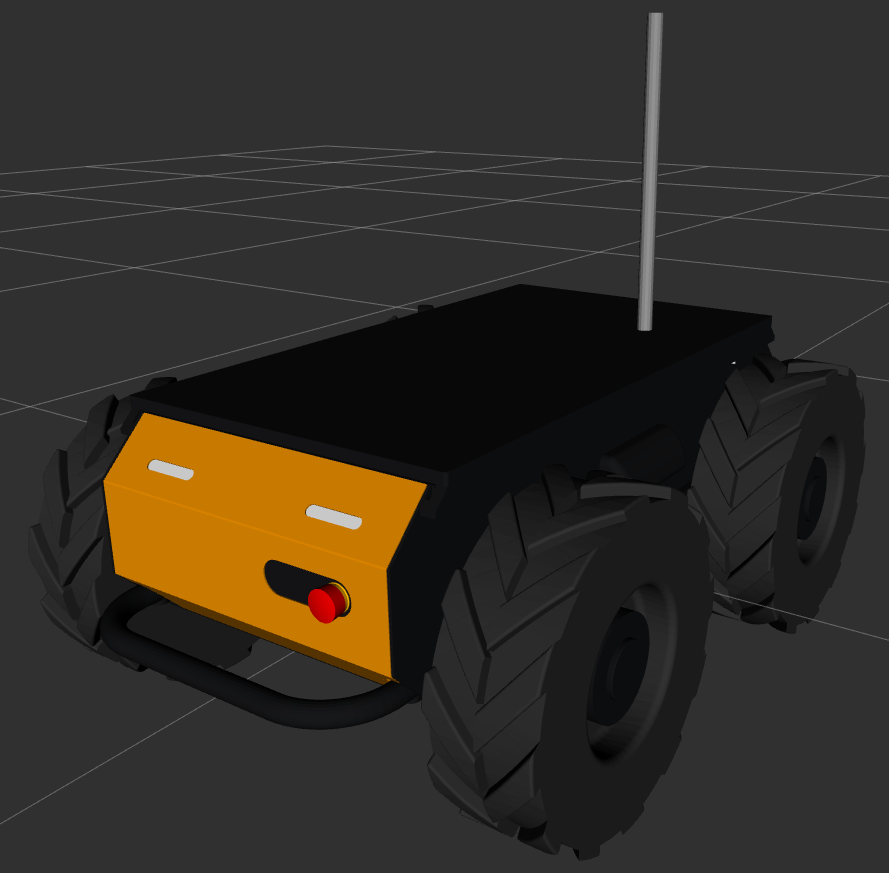
my_antenna custom URDFExtras Launch
The launch files specified in this section are started as part of the clearpath-platform-extras.service job. Each launch file can be specified either as an absolute path or as a relative path within a package. Additionally, launch arguments may be specified with the args field:
platform:
  extras:
    launch:
      - path: /absolute/path/to/some/file.launch.py
      - path: launch/my_launch_file.launch.py
        package: my_package
      - path: launch/my_launch_with_args.launch.py
        package: my_other_package
        args:
          spam: eggs
          foo: bar
The three launches above are equivalent to the following command-line invocations:
ros2 launch /absolute/path/to/some/file.launch.py

ros2 launch my_package launch/my_launch_file.launch.py

ros2 launch my_other_package launch/my_launch_with_args.launch.py spam:=eggs foo:=bar
In 2.7.x and earlier extras.launch only supported a single launch file:
platform:
  extras:
    path: launch/my_launch_file.launch.py
    package: my_package
If your robot.yaml file contains the old format you will see a deprecation notice. We recommend updating your robot.yaml to the new format by converting extras.launch to a list.
To check the status of the extras launch, run
systemctl status clearpath-platform-extras.service
To view the raw output from the extras launch, run
sudo journalctl -fu clearpath-platform-extras.service
ROS Parameters
A common use case is to set and update the parameters to the platform_velocity_controller node. These can be used to modify the linear and angular velocity and acceleratation.
These can be passed in as follows:
The wheel_radius parameter only needs to be set if you have physically changed the wheels. It can be omitted if you only want to adjust velocity or acceleration limits.
- A300
- A200
- D1X0-D
- D1X0-O
- J100
- R100
- W200
A300 Husky Controller Defaults:
platform:
  extras:
    ros_parameters:
      platform_velocity_controller:
        wheel_radius: 0.1625
        linear.x.max_velocity: 2.0
        linear.x.min_velocity: -2.0
        linear.x.max_acceleration: 2.0
        linear.x.min_acceleration: -2.0
        angular.z.max_velocity: 2.0
        angular.z.min_velocity: -2.0
        angular.z.max_acceleration: 4.0
        angular.z.min_acceleration: -4.0
A200 Husky Controller Defaults:
platform:
  extras:
    ros_parameters:
      platform_velocity_controller:
        wheel_radius: 0.1651
        linear.x.max_velocity: 1.0
        linear.x.min_velocity: -1.0
        linear.x.max_acceleration: 1.0
        linear.x.min_acceleration: -1.0
        angular.z.max_velocity: 1.0
        angular.z.min_velocity: -1.0
        angular.z.max_acceleration: 1.0
        angular.z.min_acceleration: -1.0
D1X0-D Dingo-D Controller Defaults:
platform:
  extras:
    ros_parameters:
      platform_velocity_controller:
        wheel_radius: 0.049
        linear.x.max_velocity: 1.3
        linear.x.min_velocity: -1.3
        linear.x.max_acceleration: 1.0
        linear.x.min_acceleration: -1.0
        angular.z.max_velocity: 4.0
        angular.z.min_velocity: -4.0
        angular.z.max_acceleration: 2.0
        angular.z.min_acceleration: -2.0
D1X0-O Dingo-O Controller Defaults:
platform:
  extras:
    ros_parameters:
      platform_velocity_controller:
        kinematics.wheels_radius: 0.05
        linear.x.max_velocity: 1.3
        linear.x.min_velocity: -1.3
        linear.x.max_acceleration: 1.0
        linear.x.min_acceleration: -1.0
        linear.y.max_velocity: 1.3
        linear.y.min_velocity: -1.3
        linear.y.max_acceleration: 1.0
        linear.y.min_acceleration: -1.0
        angular.z.max_velocity: 4.0
        angular.z.min_velocity: -4.0
        angular.z.max_acceleration: 2.0
        angular.z.min_acceleration: -2.0
J100 Jackal Controller Defaults:
platform:
  extras:
    ros_parameters:
      platform_velocity_controller:
        wheel_radius: 0.098
        linear.x.max_velocity: 2.0
        linear.x.min_velocity: -2.0
        linear.x.max_acceleration: 2.0
        linear.x.min_acceleration: -2.0
        angular.z.max_velocity: 4.0
        angular.z.min_velocity: -4.0
        angular.z.max_acceleration: 4.0
        angular.z.min_acceleration: -4.0
R100 Ridgeback Controller Defaults:
platform:
  extras:
    ros_parameters:
      platform_velocity_controller:
        kinematics.wheels_radius: 0.0759
        linear.x.max_velocity: 1.3
        linear.x.min_velocity: -1.3
        linear.x.max_acceleration: 1.0
        linear.x.min_acceleration: -1.0
        linear.y.max_velocity: 1.3
        linear.y.min_velocity: -1.3
        linear.y.max_acceleration: 1.0
        linear.y.min_acceleration: -1.0
        angular.z.max_velocity: 4.0
        angular.z.min_velocity: -4.0
        angular.z.max_acceleration: 2.0
        angular.z.min_acceleration: -2.0
W200 Warthog Controller Defaults:
platform:
  extras:
    ros_parameters:
      platform_velocity_controller:
        wheel_radius: 0.3
        linear.x.max_velocity: 5.0
        linear.x.min_velocity: -5.0
        linear.x.max_acceleration: 2.5
        linear.x.min_acceleration: -2.5
        angular.z.max_velocity: 4.0
        angular.z.min_velocity: -4.0
        angular.z.max_acceleration: 2.0
        angular.z.min_acceleration: -2.0